The content management landscape for the architecture, engineering, and construction (AEC) industry is changing. If your firm is still relying on UNIFI for Revit content management, the clock is ticking to transfer your firm’s data to a new content management system (CMS). The biggest risk isn’t losing the tool, it’s losing access to the content and workflows your team depends on. Based on conversations with global, multidisciplinary AEC firms that successfully migrated from UNIFI to AVAIL, here are the practical lessons they recommend for making the transition smoother.
Start with a Migration Plan
Every former UNIFI customer now faces the same challenge: moving content into a new content management platform. While every firm's libraries are different, the firms we spoke with encountered many of the same obstacles during their migrations.
Their advice consistently centered on six steps:
- Step 1: Export Your UNIFI Library
- Step 2: Treat Migration as a Library Cleanup
- Step 3: Design Your Organization Strategy Before Importing
- Step 4: Test Your Structure Before Investing Time in Metadata
- Step 5: Plan for Images Early
- Step 6: Prepare Users for New Workflows

About AVAIL
AEC’s All-In-One Content Management Solution
AVAIL is the AEC industry’s most trusted CMS. Serving as a single, streamlined content management and access solution for firms, AVAIL’s desktop content management platform and add-ins for Revit, AutoCAD, and Civil 3D centralize access to all of a firm’s technical content for easy search and reuse.
Step 1: Export Your UNIFI Library
For every firm we spoke with, retrieving content from UNIFI was the first major hurdle. Several described the export process as unclear and more difficult than expected. One firm attempted to retrieve its libraries through Autodesk Content Catalog but still found the process confusing. Others ultimately relied on internal developers to build custom tools or scripts to download their content.
If this is where you find yourself stuck, we too have put some developer brain power toward this problem. Contact our Sales Director Will Rouse for access to tools that can help BIM managers retrieve content from UNIFI.
The common takeaway was simple: before planning your AVAIL implementation, make sure all of your content has been successfully exported from UNIFI.
Step 2: Treat Migration as a Library Cleanup
Rather than copying every file into a new system, several firms used the migration as an opportunity to review years of accumulated content.
Many described the migration as a "housekeeping" exercise—evaluating what should remain part of the firm's standards and what should be retired.
Instead of asking, "How do we move everything?" they asked, "What content deserves to move?" For many BIM managers, this became one of the biggest long-term benefits of the migration.
The Elephant in the Room at Hoefer Welker
In the webinar Lean Templates & Smarter Content Workflows: Organization Palettes in Practice, Design Technology Manager Reed Weinstock shared Hoefer Welker’s experience transitioning to AVAIL from UNIFI.
Step 3: Design Your Organization Strategy Before Importing
It is no small feat to organize digital assets for your firm, but the good news for former UNIFI users is: firms who have already thought through content management are the easiest to onboard to AVAIL.
Your users are already trained to access the content they need through a CMS, and your organization systems can be easily reflected in AVAIL’s customizable platform.
However, a consistent recommendation from firms who migrated from UNIFI to AVAIL was to actually avoid rebuilding your UNIFI structure exactly as it existed (see step 2).
Instead, one firm had each discipline review its own content in Excel before anything was imported into AVAIL. This gave every team ownership of the new organization strategy, while allowing the firm to rethink how content should be grouped.
Planning focused on defining how content would be grouped in AVAIL’s solution:
Several firms also noted that spreadsheet-based planning could significantly reduce the time required to assign metadata during migration.
Cordogan Clark Reevaluates Content Management
In the webinar Customizing AVAIL with AI: Top Firms Use New Tools to Design Channel Cards, Design Technology Officer Alex Reed shared Cordogan Clark’s experience migrating between content management solutions.
Step 4: Test Your Structure Before Investing Time in Metadata
Another lesson that emerged repeatedly was to resist organizing content in isolated batches.
One firm recommended importing everything into a test Channel first—even before the metadata was fully refined.
Only after seeing the complete library together could the team accurately judge whether their tags and Key Card strategy made sense, how many tags were actually needed, and where additional metadata would improve search.
Looking at the entire library provided a much clearer picture than working category by category.
Step 5: Plan for Images Early
AVAIL gives teams the opportunity to preview content in high resolution, directly from the AVAIL platform. Those high-resolution previews and thumbnails can be achieved through AVAIL’s Harvest workflow, or with third-party solutions like Iconic BIM’s Preview Image Generator (P.I.G.) tool.
Regardless of what you use to bring in the imagery, several firms also recommended planning preview images earlier than they originally did. Cleaning up previews after a migration proved more difficult than addressing them as part of the implementation process.
Teams also noted that if additional software or approvals were required, those conversations should begin early to avoid delaying the rollout.

Managing Multiple Revit Versions?
AVAIL's Revit Application Version Management is a direct solution for UNIFI’s versioning. It removes friction from content distribution by connecting version-aware content handling to your firm's distribution model. The result is more reliable delivery of the correct content to the correct Revit application context.
Step 6: Prepare Users for New Workflows
Even after the content has been migrated, users still need time to adjust. Several firms mentioned that features they relied on in UNIFI had corresponding workflows in AVAIL, but users naturally had questions during the transition.
Revit version management and Organization Palettes (like saved searches) were specifically highlighted as workflows that became easier once teams had time to adopt them.
Another lesson involved timing. One firm noted that fully removing access to UNIFI took longer than expected, making it worthwhile to plan how and when users will transition to AVAIL.

Recorded Webinar
Navigating Change: How SOM & LDG Champion Software Adoption
Software adoption experts from firms SOM and Larson Design Group discuss proven change management strategies with AVAIL’s Clay Watson
Migrating Firms from UNIFI Since 2017
While there is a new reason for firms to want to migrate from UNIFI to AVAIL — now that UNIFI has been acquired by Autodesk and transitioned to the Autodesk Content Catalog tool — transitioning teams from UNIFI is not new for the AVAIL team. In fact, we have been assisting firms with this task since 2017, when AVAIL’s content management system was launched.
What we’ve learned is that migration time varies by firm. Some firms have pulled this off in as little as a few weeks, and some take longer to go through a more deliberate cleanup process — like many of the firms we interviewed for this blog.
Regardless of your firm’s migration plan, however, we have tools and programs that can aid in the more painstaking processes.
Curious what a transition to AVAIL would look like for your firm? Contact Sales Director Will Rouse to discuss.
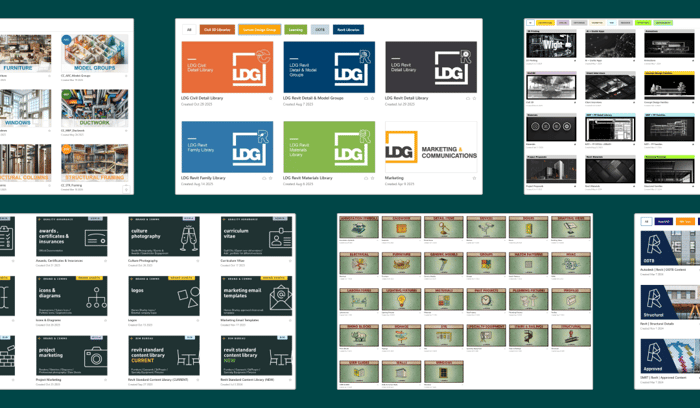
AVAIL's content management tools like Channel Cards and Key Cards give firms the power to personalize their AVAIL environment for their firm's needs and brand.
ABOUT AVAIL
Founded in 2016 as a solution for architecture and engineering firms to find the information they need faster, AVAIL creates software for the global architectural, engineering, and construction (AEC) industry. AVAIL’s content management system (CMS) platform and Revit, AutoCAD, and Civil 3D application tools help designers and engineers take control of their intricate network of files in one visual, streamlined solution. AVAIL’s customers include industry leaders Gensler, Perkins&Will, IMEG, LEO A DALY, and Populous.